Team naming · Check the counting unit
Why an emoji team name can exceed the character limit
Published:
Check which unit the name field counts before shortening an emoji team name. One visible symbol can contain several Unicode code points. In our recorded test, the same complete team name displayed as twenty characters in our generator and fourteen in an emoji counter. A count from another tool does not establish that your event's form will accept the name.
We tested this on October 30, 2026, with an invented brief in Random Team Split: General team or club, Everyday team, Quiet, twelve candidates and no excluded text. Only the label and character limit changed between these runs. No real teams were registered.
What happened at eighteen characters?
The family label 👨👩👧👦 produced zero matching combinations at eighteen characters, and Generate reported that no names fit. Replacing just that label with 👨 produced twenty-two matching combinations and twelve displayed candidates. The eligible pool changed before we saved or downloaded anything. Both labels can render as one emoji; this run did not treat them as having the same length.
Did raising the limit preserve the name?
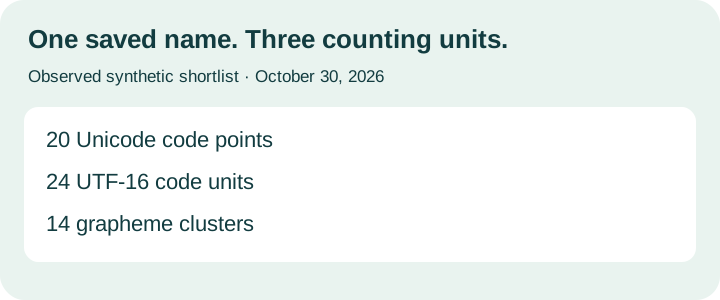
The family label worked at thirty. Restoring it and raising the limit produced twenty-four matching combinations and twelve candidates. One was 👨👩👧👦 Ribbon Notes, marked twenty characters. We shortlisted it and downloaded both files. Both files preserved the spelling: the CSV's Name cell matched the TXT's first ranked name, including the joiners. A local check of those saved files returned twenty code points, twenty-four UTF-16 units and fourteen grapheme clusters.
The separate counter gave a different total. We pasted that exact full name into wordcounter.ai's Emoji Counter. Its visible readout showed one emoji, one unique emoji, fourteen characters and one ZWJ sequence. Our generator had displayed twenty for the same spelling.
Neither number was a test of an event's acceptance rule; the two actual readouts show why a separate counter's character total cannot stand in for the field you intend to use.
Which count should you follow?
Code units, code points and grapheme clusters are different units. JavaScript's string length measures UTF-16 code units; grapheme segmentation can group a compound emoji into one cluster. MDN documents both distinctions. Other counters already explain the family emoji principle. The dated filter, display and file records below document this particular test.
Can you repeat the check?
Use the settings above and copy the exact labels from the saved record. Random candidate order can change, so draw again if Ribbon Notes is absent at thirty characters. Download the observed CSV, TXT and replay instructions to compare the archived spelling locally. The replay checks saved strings, not future generator behavior.
Will the event accept your name?
Check the receiving form's stated rule and its actual validation. Keep the full chosen spelling, including joiners and spaces, when testing. If that field rejects it, remove the decorative emoji or choose wording it accepts. This guide does not establish a limit for any league, messaging app or scoreboard, or guarantee one-picture rendering on your device.
Observed files and replay
The local check uses Intl.Segmenter for grapheme clusters. It reads only the downloaded files.