How many flips do you need?
Enter a whole number from one to one hundred. The 2, 3 and 100 buttons set that count; press Flip to generate. Each position is a separate draw, so the same result can appear more than once. Flip again replaces the current batch instead of adding to a hidden history.
Coin mode uses Heads and Tails. Custom two-outcome mode accepts two labels. Three-way simulation accepts three labels; it is a random choice among three outcomes, not a physical model of an ordinary two-sided coin. Enter one label per line, with up to forty characters per label. Blank lines are ignored and surrounding spaces removed. Repeated labels, including differences only in case, must be corrected.
A two-coin audit you can reproduce
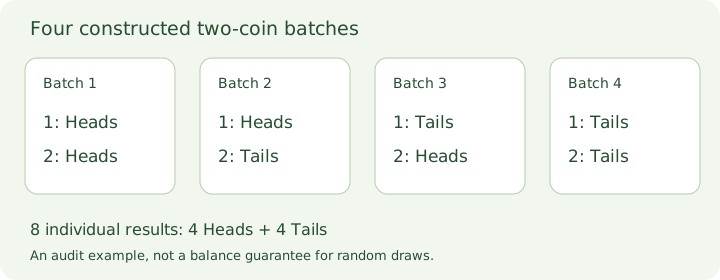
The order matters. Heads/Tails puts Heads first; Tails/Heads puts it second. Our four constructed batches are Heads/Heads, Heads/Tails, Tails/Heads and Tails/Tails. This is a complete two-position example, not four results promised by the tool.
Read those four rows as eight individual flips. There are four Heads and four Tails altogether. Two batches have mixed results, one has two Heads and one has two Tails. Counting only the total Heads would lose the difference between the two mixed batches. This constructed table is separate from the live random result above.
For a live two-flip check, select 2 and flip once. The cards must show Flip 1 and Flip 2, and the two summary counts must add to two. Both cards can show Heads or both can show Tails. A two-result batch does not promise one of each. Download that batch before drawing again and check which label belongs at each position.
A twelve-draw custom rehearsal
Our three-way example uses invented activity labels Read / C01, Draw / C02 and Build / C03. Load the example and generate twelve results. Every result must be one of those three exact labels, and their summary counts must add to twelve. No real classroom or participant preferences are represented.
For an independent audit exercise, use this constructed sequence: Read, Draw, Build, Read, Build, Draw, Build, Read, Draw, Draw, Read, Build. Each shortened name refers to its full example label. Read occupies positions 1, 4, 8 and 11; Draw occupies 2, 6, 9 and 10; Build occupies 3, 5, 7 and 12. The four occurrences each are a property of this example, not a balance guarantee for random draws.
Change position 8 from Read to Draw in a deliberately damaged copy. There are still twelve records, but the counts become three Read, five Draw and four Build. Comparing only the total would miss the changed outcome. Compare positions and labels against the accepted batch, then recount each outcome.
Which batch did you save?
CSV contains Flip and Outcome columns, with one data row per result. TXT lists the same numbered results. Print includes the outcome definitions, counts and result table; the settings and article are hidden. Check the browser's print preview and paper settings.
Keep every result. Our twelve-draw rehearsal has twelve CSV data rows plus one header. A 100-flip batch has one hundred data rows, not one row containing the tally. Verify that positions run from 1 through 100 once each, recount Heads and Tails from those rows, and compare both counts with the screen. A missing position and a duplicated position can leave the total row count unchanged.
For a separate synthetic export audit, we chose =Plan / E01 and Check, "pair" / E02 as the two custom labels. In a constructed two-result trace, position 1 is =Plan / E01 and position 2 is Check, "pair" / E02. This is a file-check fixture, not a random outcome we promise. Its labels exercise two different export rules in the same small batch.
The parsed CSV must contain two data rows. The first Outcome cell starts with an apostrophe before =Plan / E01; the second contains the comma and both quotation marks as part of one label. Neither symbol creates another flip or column after CSV decoding. TXT retains =Plan / E01 without that export prefix. Compare each numbered result with the screen before interpreting either count. Reversing the rows would preserve the two totals but assign the wrong outcome to each flip number.
CSV preserves commas and quotation marks within a label and prefixes an apostrophe before labels beginning with =, +, @ or - for spreadsheet formula protection. The screen and TXT keep the entered label. Editing the count, mode or custom labels clears the result and download links; files already downloaded remain unchanged.
Must a batch split evenly?
The code draws from browser-generated random values, rejecting values outside a whole multiple of the outcome count before mapping them to labels. Every configured outcome uses the same selection rule, without weights. A short batch may be uneven, and a new batch can repeat earlier results. There is no promise of fifty Heads in one hundred flips or of a new result after several repeats.
This page simulates named outcomes. It does not model dice faces, coin thickness, a real object's landing conditions, or how people should be assigned to groups. Labels and results stay in this tab, are not placed in analytics or sharing URLs, and disappear on reload. Save the result you intend to use before leaving.