How to shuffle a list
Keep repeated items. Paste one item per line and press Shuffle list. You get one complete order, numbered from one. Blank lines are ignored and surrounding spaces are removed. The tool does not divide entries into teams or select a single winner.
A six-entry rehearsal
Our presentation fixture contains Map / O01, Sketch / O02, Map / O03, Demo / O04, Notes / O05 and Close / O06. These six labels are invented for this exercise. The two Map entries represent separate presentation slots, so neither should disappear. Load the sample and shuffle once.
Each result row carries two numbers: its new position and its input entry. Input entry means its position among the non-empty input items, not its physical line number. Map / O03 starts as input entry 3. Wherever it lands, that number stays beside it.
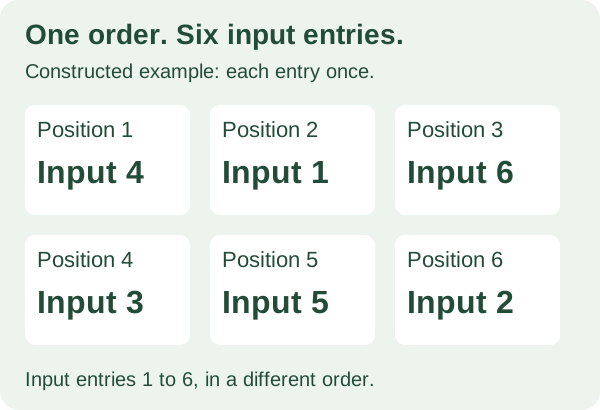
For a deliberately constructed order, use input entries 4, 1, 6, 3, 5, 2. The labels become Demo / O04, Map / O01, Close / O06, Map / O03, Notes / O05, Sketch / O02. This is a teaching example, not a random result the tool promises.
Does every entry appear once?
Check both columns. In our rehearsal, new positions must run from 1 through 6. Input entries must also contain 1 through 6, once each, in any order. Match each item to its input entry: row 1 in the constructed order is input entry 4, Demo / O04.
A six-row file can still be wrong. In a deliberately damaged copy of the constructed order, replace input entry 3 with another input entry 1. There are still six rows, but entry 3 is missing and entry 1 occurs twice. The input-entry column catches that failure even if both Map labels were shortened to the same word.
Add a blank line after the first Map label. The rehearsal still has six input entries and Sketch / O02 remains entry 2. Add a second copy of Demo / O04 instead and there are seven entries. The tool keeps both copies; decide whether that extra slot belongs in your list before drawing.
Save the order you accept
Download CSV or TXT before shuffling again. CSV has Position, Input entry and Item columns. TXT gives each position, its input entry and the item. Both files describe the visible order. Editing the input clears that result and removes its download links. Files already saved do not change.
CSV quotes commas and double quotes. Items starting with =, +, @ or - receive a leading apostrophe for spreadsheet formula protection. TXT and the screen keep the original label. Treat a comma inside an item as text; this input accepts lines, not CSV uploads.
Will shuffling change every position?
A second draw can repeat the first. Items can stay in their previous positions, and the whole order can repeat. The browser shuffles the complete list with a random draw. There is no round history, exclusion rule or automatic rotation. A shuffled task list does not understand dependencies; keep steps that require a fixed order separate.
Your list stays in this tab
Entries and results stay in this tab, without an account or a remote AI service. Reloading clears them. They are not included in analytics or sharing URLs. Downloads contain your entered text, so save them where you intend to use them.
Need people assigned to teams?
Use the separate group generator for group counts or size limits, or the pair generator for partners. This list randomizer makes one order from existing entries. It does not invent new names, allocate teams or create a tournament schedule.